
Technician dispatch
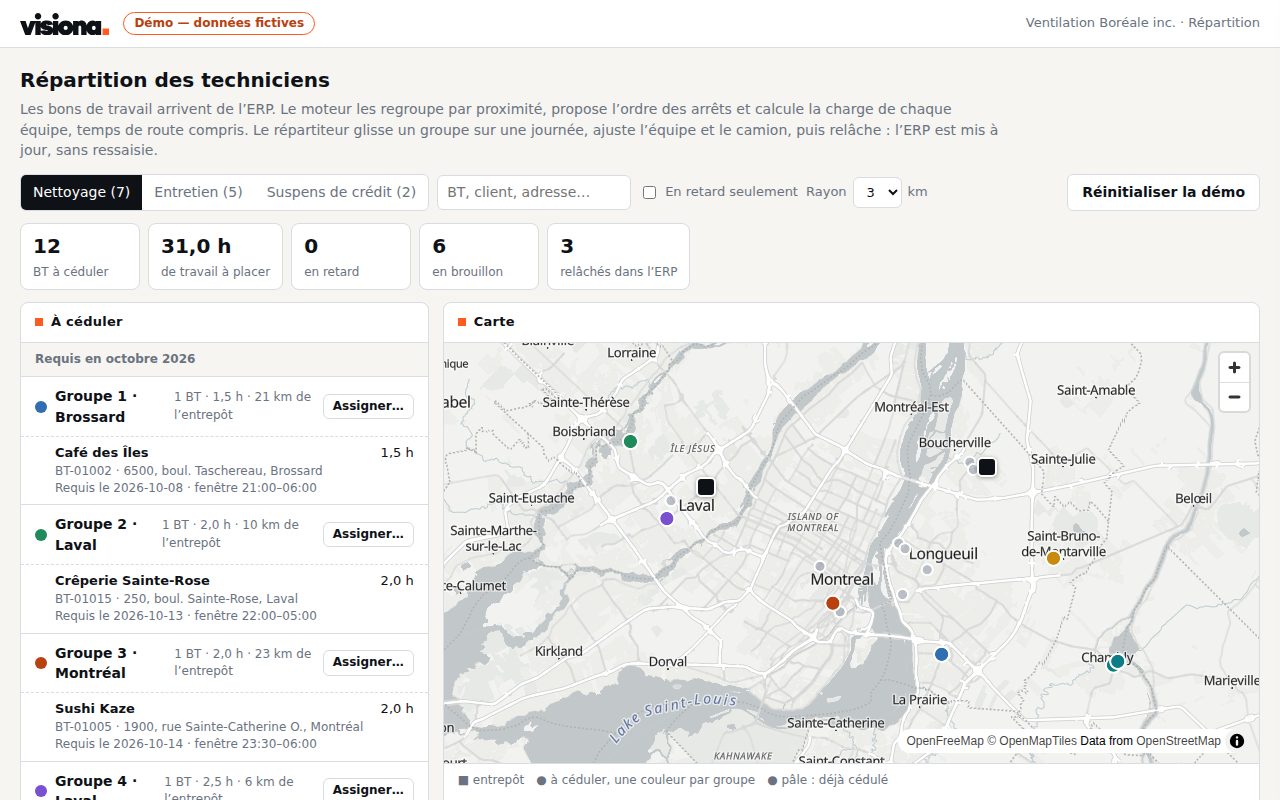
Work orders are grouped by area on a map, the crews' week is planned in a few clicks, routes are optimised and the schedule goes back to your ERP.
Who it is for · Service and dispatch teams with crews on the road
Working code every week
Every sprint ships something your team uses.
You own everything
The code, the database, the servers. No licence.
Rules you can check
Your rules written in code, every decision logged.
Fixed price, stop anytime
One feature a week, no long-term contract.
The problem
Dispatch happens in a spreadsheet or from memory, call by call.
- Technicians crossing town twice a day
- Missed or double-booked appointments
- An ERP that does not reflect what really happens
What changes
A week board where every work order is placed by area, skill and availability.
- Fewer kilometres, more calls a day
- The whole week at a glance
- The ERP up to date without keying twice
How it works
- Open work orders are read from your ERP
- They are grouped by proximity on a map
- The dispatcher places the groups in the crews' week
- Each day's route is optimised, then the schedule is released to the ERP
Anonymised use case
An industrial services company, some twenty technicians
Work orders live in the ERP, but the week is built on a whiteboard, urgent calls are placed by phone and actual hours arrive in a spreadsheet on Friday.
| Per transaction | Before | With the brain |
|---|---|---|
| Plan the crews' day | 1 h | 10 min |
| Place an urgent call | 15 min | 2 min |
| Close a job (hours, notes) | 20 min | 2 min |
| A week of planning | 5 h | 50 min |
Mistakes the rules avoid
- Skill required by the work order and the technician's certifications
- Time off, availability and the day's capacity in hours
- The customer's time window and the area
- Double booking and overlaps flagged before anything is sent
- Visiting order optimised: no swap shortens the trip any further
Exchanges avoided
- The "where is the technician?" and "when will he arrive?" calls
- Appointment confirmations made one by one
- Re-keying hours and notes into the ERP at the end of the week
About 4 hours a week given back to the dispatcher, fewer kilometres, and productivity known the same day.
Estimates from our projects, for one complete operation; your volumes change the total.
Custom built, from a proven base
This is not off-the-shelf software. The solution has already been built and run in production; your project starts from that code, then everything is fitted to your team:
- Your integrations built for your systems, through their API, not a generic connector.
- Your data sources your email, your ERP, your Excel files, as they are today.
- Your rules written in code with your team, then checked on last month's data.
- Your interface the screens, approvals and alerts your team needs, nothing more.
Starting from a proven base means a first result on your own data in the first week.
What the solution includes
- Open work orders are read from your ERP, with the address, duration and skill required
- They are grouped by area on a real map
- Each crew's week is planned in a few clicks, with time off and availability
- Each day's route is optimised: fewer kilometres, more calls
- Conflicts (double booking, missing skill) are flagged before anything is sent
- The schedule is released to the ERP in one click, without keying it again
- Every change is logged: who, when, why
Systems already integrated, for example
- ERP or field-service software: Epicor, or the one you already use
- Calendars: Microsoft 365, Google Workspace
- Maps: OpenStreetMap, no per-user licence
- Your current Excel files, to start
Each integration is built for your systems. Yours isn't listed? We integrate it through its API.
Your first three sprints
Sprint 1
Connect
Your sources are connected and a first version runs on your real data.
Sprint 2
Rules
Your rules run on last month's data and are compared with what the team did by hand; every gap is explained.
Sprint 3
Release
One team uses it first, with every decision tracked, then we widen.
Price
$1,500 CAD
per sprint, one week · One sprint = one usable feature.
- Fixed price, known upfront No hourly rate, no overruns.
- Sprints on demand Stop before the next invoicing cycle, no penalty.
- You keep everything Every feature delivered is yours, even if you stop.
Frequently asked questions
Do we have to replace our field-service software?
No. Work orders stay in your ERP or software; dispatch happens beside it and goes back to it. Your system stays the source of truth.
Do technicians have to install an app?
No. They receive their work orders as they do today. A view of their day on the phone can be added in a later sprint.
How is the route optimised?
By a deterministic calculation: work orders are grouped by proximity, then each day's visiting order is improved until no swap shortens the trip. The dispatcher keeps the last word.
Can we start with a single crew?
Yes, and we recommend it: one crew or one region first, a full week watched, then we widen.
Who owns the code?
You do. The code, the database and the servers are in your name from the first sprint. No licence, no per-user fee.
Do we have to change our ERP or accounting software?
No. We work around your systems. If there is no accounting software yet, QuickBooks or Zoho Books is enough as the ledger.
What happens if we stop?
Nothing breaks. You keep the code, the data and the documentation; another team can take over.
Discovery questionnaire
Two questions to prepare our first conversation. One minute.
Other solutions
- Vacation and leave approvalsManagers and HR in businesses of 10 to 200 employees
- Automated supplier invoicesAccounting and purchasing teams, with an ERP or accounting software
- E-signature and contract managementManagement, sales and administration teams that sign contracts every week
- Quotes in minutesSales teams that sell installations or projects
- Automated bookkeeping and bank reconciliationAccounting and management in SMBs, with QuickBooks, Zoho Books or an ERP