
Automated bookkeeping and bank reconciliation
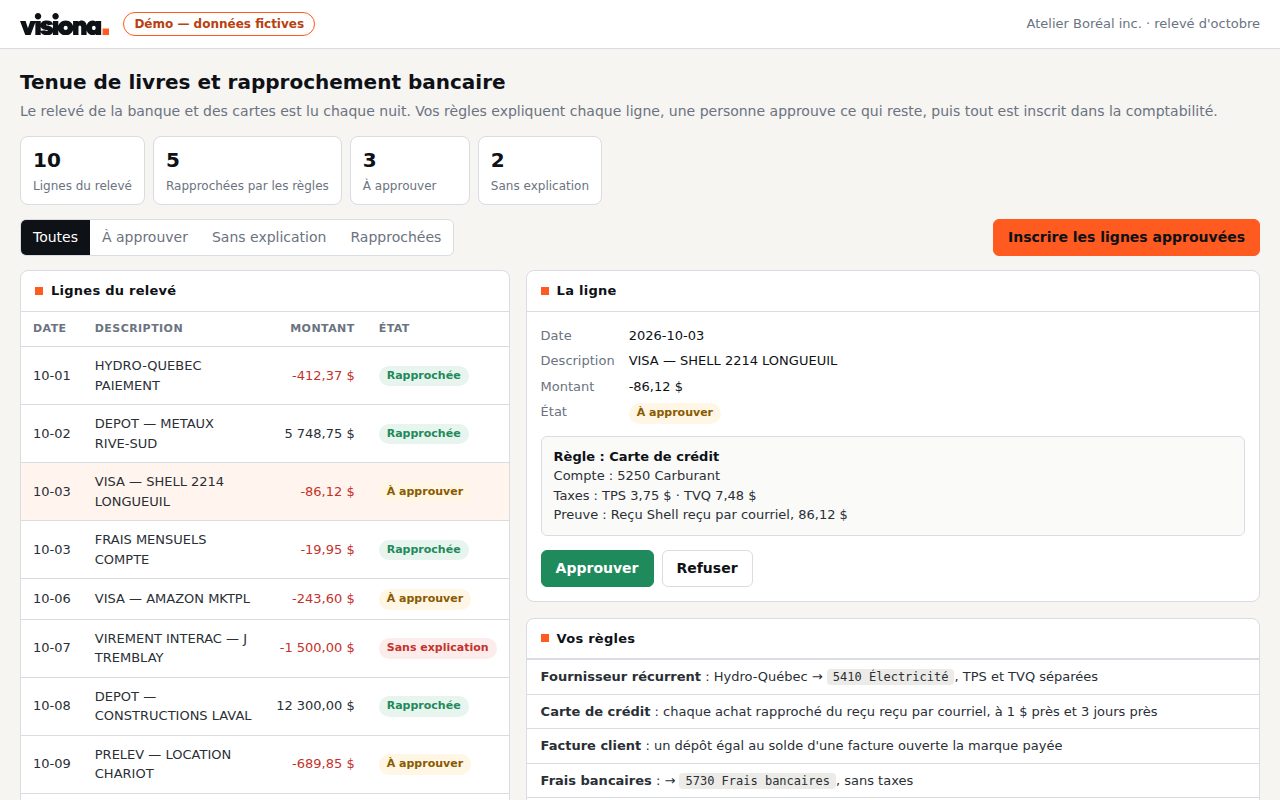
Bank and card statements are read every night; your rules explain each line with its evidence, a person approves the rest, and everything is entered in your accounting.
Who it is for · Accounting and management in SMBs, with QuickBooks, Zoho Books or an ERP
Working code every week
Every sprint ships something your team uses.
You own everything
The code, the database, the servers. No licence.
Rules you can check
Your rules written in code, every decision logged.
Fixed price, stop anytime
One feature a week, no long-term contract.
The problem
Each statement line is explained by hand: find the receipt, guess the account, split the taxes. The month closes late.
- Hours of reconciliation every month
- Lost receipts and miscoded expenses
- A month-end that depends on one person
What changes
Known lines explain themselves; your team sees only the exceptions, with the rule and the evidence.
- The month closed in days
- Every entry backed by its document
- Every decision logged
How it works
- Bank and card statements are read every night
- Receipts and invoices received by email are read by AI
- Your rules match each line: supplier, account, taxes, document
- A person approves or explains the rest, then everything is entered
Anonymised use case
A 15-person services company, 250 statement lines a month
The owner reconciles the bank statement and two credit cards in the evening, receipt by receipt, and the accountant receives a box of paper at year-end.
| Per transaction | Before | With the brain |
|---|---|---|
| Explain a statement line | 3 min | 10 s |
| Find a receipt | 5 min | already attached |
| Close the month | 2 days | 2 hours |
| 250 lines a month | 12.5 h | 45 min |
Mistakes the rules avoid
- Recurring supplier: known account and taxes, applied every time
- Card purchase matched to its receipt within $1 and 3 days
- Deposit equal to an open invoice's balance: the invoice becomes paid
- Line with no rule: waits for an explanation, never guessed
Exchanges avoided
- The "do you have the receipt for…?" emails to staff
- Year-end back-and-forth with the accountant
- Reminders for invoices already paid
About 12 hours a month given back to management, and a month closed in days.
Estimates from our projects, for one complete operation; your volumes change the total.
Custom built, from a proven base
This is not off-the-shelf software. The solution has already been built and run in production; your project starts from that code, then everything is fitted to your team:
- Your integrations built for your systems, through their API, not a generic connector.
- Your data sources your email, your ERP, your Excel files, as they are today.
- Your rules written in code with your team, then checked on last month's data.
- Your interface the screens, approvals and alerts your team needs, nothing more.
Starting from a proven base means a first result on your own data in the first week.
What the solution includes
- Bank and card statements read every night
- Receipts and invoices received by email, read and filed
- Rules per supplier: account, GST and QST split
- Customer payments matched to their open invoices
- An exception queue: what no rule explains waits for a person
- Entries posted to your accounting once approved
- GST and QST filing reminders
Systems already integrated, for example
- Accounting: QuickBooks, Zoho Books, or your ERP
- Email: Microsoft 365 and Outlook, Google Workspace
- Banks and cards: exported statements or your bank's files
- Documents: PDFs, receipt photos, Excel
Each integration is built for your systems. Yours isn't listed? We integrate it through its API.
Your first three sprints
Sprint 1
Connect
Your sources are connected and a first version runs on your real data.
Sprint 2
Rules
Your rules run on last month's data and are compared with what the team did by hand; every gap is explained.
Sprint 3
Release
One team uses it first, with every decision tracked, then we widen.
Price
$1,500 CAD
per sprint, one week · One sprint = one usable feature.
- Fixed price, known upfront No hourly rate, no overruns.
- Sprints on demand Stop before the next invoicing cycle, no penalty.
- You keep everything Every feature delivered is yours, even if you stop.
Frequently asked questions
Do we have to give access to our bank account?
No. The brain reads the statements you export or your bank sends; it does not connect to your accounts and makes no payment.
What if a line matches no rule?
It waits for a person, with what was found. Nothing is guessed: an unknown line is never entered without approval.
Can our outside accountant use it?
Yes. They see each entry with its rule and document, and approve or correct it; year-end is prepared month after month.
How long before it works?
The first sprint reads your real statements and receipts. By the second, your rules run on last month and every gap is explained.
Who owns the code?
You do. The code, the database and the servers are in your name from the first sprint. No licence, no per-user fee.
Do we have to change our ERP or accounting software?
No. We work around your systems. If there is no accounting software yet, QuickBooks or Zoho Books is enough as the ledger.
What happens if we stop?
Nothing breaks. You keep the code, the data and the documentation; another team can take over.
Discovery questionnaire
Two questions to prepare our first conversation. One minute.
Other solutions
- Vacation and leave approvalsManagers and HR in businesses of 10 to 200 employees
- Automated supplier invoicesAccounting and purchasing teams, with an ERP or accounting software
- Technician dispatchService and dispatch teams with crews on the road
- E-signature and contract managementManagement, sales and administration teams that sign contracts every week
- Quotes in minutesSales teams that sell installations or projects