
Automated supplier invoices
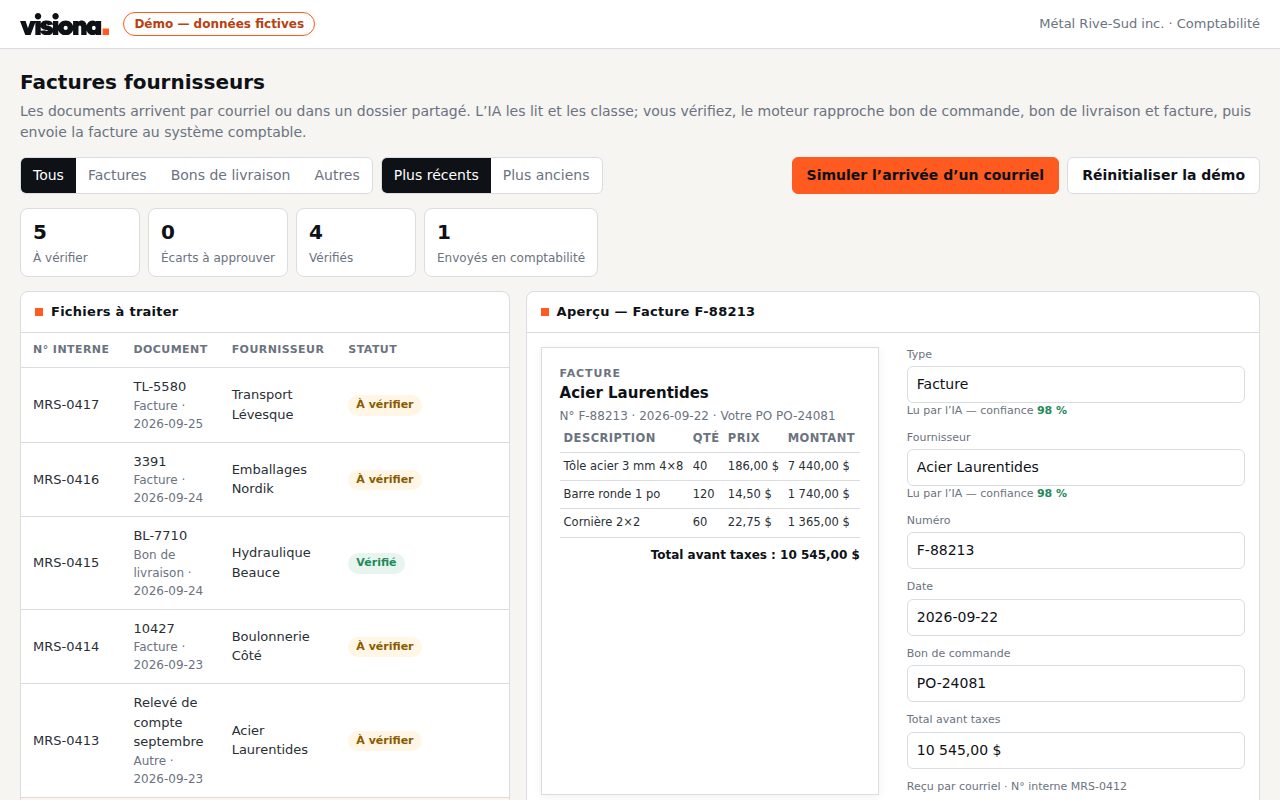
Invoices arrive by email, AI reads them, your rules match them to the purchase order and the delivery slip, and a person approves in one click before they reach accounting.
Who it is for · Accounting and purchasing teams, with an ERP or accounting software
Working code every week
Every sprint ships something your team uses.
You own everything
The code, the database, the servers. No licence.
Rules you can check
Your rules written in code, every decision logged.
Fixed price, stop anytime
One feature a week, no long-term contract.
The problem
Each invoice is opened, read and keyed in by hand, then checked against the purchase order and the delivery slip.
- Hours of data entry every week
- Price or quantity gaps found too late
- Duplicate invoices paid twice
What changes
Invoices that match go through on their own; your team sees only the exceptions, with the evidence and the rule that flagged them.
- Data entry close to nothing
- Every gap explained before payment
- Every decision logged
How it works
- A dedicated mailbox receives the invoices
- AI extracts supplier, amounts, taxes and lines
- Your rules match order, receipt and invoice
- A person approves, then the bill is created in your ERP or accounting software
Anonymised use case
A distribution SMB, 170 supplier invoices a month
Invoices arrive by email, as PDFs. One person keys them into the accounting software, checks them against the purchase order and the receipt, then chases approvals.
| Per transaction | Before | With the brain |
|---|---|---|
| Key in and check an invoice | 6 min | 30 s |
| Settle a gap with the supplier | 15 min | 3 min |
| Get an invoice approved | 1 to 2 days | 1 click |
| 170 invoices a month | 17 h | 1.5 h |
Mistakes the rules avoid
- Duplicate stopped: same supplier, same number, or the same amount a few days apart
- Price gap over 2% or quantity different from the receipt: flagged with the evidence
- GST (5%) and QST (9.975%) recalculated on every invoice
- Expense account proposed from the supplier's history
- Invoice without a purchase order above a threshold: approval required
Exchanges avoided
- The internal "did you approve the invoice from…?" emails
- Accounting's calls to find out where an invoice stands
- Back-and-forth with the supplier without exact figures: the gap goes out with its evidence
About 15 hours a month given back to the team, and duplicates stopped before payment.
Estimates from our projects, for one complete operation; your volumes change the total.
Custom built, from a proven base
This is not off-the-shelf software. The solution has already been built and run in production; your project starts from that code, then everything is fitted to your team:
- Your integrations built for your systems, through their API, not a generic connector.
- Your data sources your email, your ERP, your Excel files, as they are today.
- Your rules written in code with your team, then checked on last month's data.
- Your interface the screens, approvals and alerts your team needs, nothing more.
Starting from a proven base means a first result on your own data in the first week.
What the solution includes
- A dedicated mailbox receives invoices, delivery slips and statements, as PDFs or images
- AI reads the supplier, number, dates, every line and the taxes (GST, QST)
- Your rules match the purchase order, the receipt and the invoice
- Price or quantity gaps are flagged, with the evidence and the rule that found them
- Duplicates are stopped before payment
- A person approves in one click; the bill is created in your ERP or accounting software
- Every decision is logged, with the AI cost per invoice
Systems already integrated, for example
- ERP: Epicor, or the one you already use
- Accounting: QuickBooks, Zoho Books
- Email: Microsoft 365 and Outlook, Google Workspace
- Documents: PDF, scanned images, Excel
Each integration is built for your systems. Yours isn't listed? We integrate it through its API.
Your first three sprints
Sprint 1
Connect
Your sources are connected and a first version runs on your real data.
Sprint 2
Rules
Your rules run on last month's data and are compared with what the team did by hand; every gap is explained.
Sprint 3
Release
One team uses it first, with every decision tracked, then we widen.
Price
$1,500 CAD
per sprint, one week · One sprint = one usable feature.
- Fixed price, known upfront No hourly rate, no overruns.
- Sprints on demand Stop before the next invoicing cycle, no penalty.
- You keep everything Every feature delivered is yours, even if you stop.
Accounts payable automated in 3 sprints, or your money back
By the third sprint, supplier invoices arriving by email are read, matched to the purchase order, approved and entered in your accounting system. If not, we refund you.
New clients only.
Frequently asked questions
Can the AI get an invoice wrong?
Yes, which is why it never decides alone. It reads the invoice and gives its confidence; your rules check every amount against the purchase order and the receipt. A doubtful invoice waits for a person, with the evidence on screen.
Do we need purchase orders?
No. With purchase orders, matching is three-way. Without them, the rules rely on the supplier's history: the usual expense account, expected amounts, taxes.
What happens to invoices that don't match?
They land in an exception queue, with the gap in dollars and the rule that found it. Your team corrects, approves or refuses in one click, and the decision is logged.
How long before it works?
The first sprint reads your real invoices. By the third, they are matched, approved and entered in your accounting. That is our guarantee: if not, we refund you.
Do our invoices leave our environment?
No. They stay on your infrastructure. Only the text needed for reading is sent to the AI provider, on commercial terms that exclude training its models.
Who owns the code?
You do. The code, the database and the servers are in your name from the first sprint. No licence, no per-user fee.
Do we have to change our ERP or accounting software?
No. We work around your systems. If there is no accounting software yet, QuickBooks or Zoho Books is enough as the ledger.
What happens if we stop?
Nothing breaks. You keep the code, the data and the documentation; another team can take over.
Discovery questionnaire
Two questions to prepare our first conversation. One minute.
Other solutions
- Vacation and leave approvalsManagers and HR in businesses of 10 to 200 employees
- Technician dispatchService and dispatch teams with crews on the road
- E-signature and contract managementManagement, sales and administration teams that sign contracts every week
- Quotes in minutesSales teams that sell installations or projects
- Automated bookkeeping and bank reconciliationAccounting and management in SMBs, with QuickBooks, Zoho Books or an ERP